Modern Unity development often involves performing tasks that should not block the game’s execution. Whether you’re spawning enemies, loading data from a server, downloading player profiles, or communicating with Firebase, handling asynchronous operations correctly is essential for maintaining smooth gameplay.
For years, Unity developers relied heavily on Coroutines to execute tasks over multiple frames. However, with the growing adoption of modern C# features, Async/Await has become increasingly popular for handling asynchronous workflows.
This has created a common question among Unity developers:
Should you use Coroutines or Async/Await?
The answer depends on the type of task you’re performing.
In this guide, we’ll compare Unity Coroutines and Async/Await, explain how each works, discuss their advantages and limitations, and help you choose the right approach for your Unity projects in 2026.
Understanding Asynchronous Programming in Unity
Before comparing Coroutines and Async/Await, it’s important to understand what asynchronous programming means.
Normally, code executes line by line.
For example:
Load Data
Process Data
Display Data
If loading data takes several seconds, the entire application can freeze while waiting.
Asynchronous programming allows Unity to continue running while waiting for long operations to complete.
This keeps gameplay responsive and prevents frame drops.
What Are Unity Coroutines?
Coroutines are Unity’s built-in solution for executing code across multiple frames.
Instead of running everything immediately, a Coroutine can pause execution and continue later.
Example:
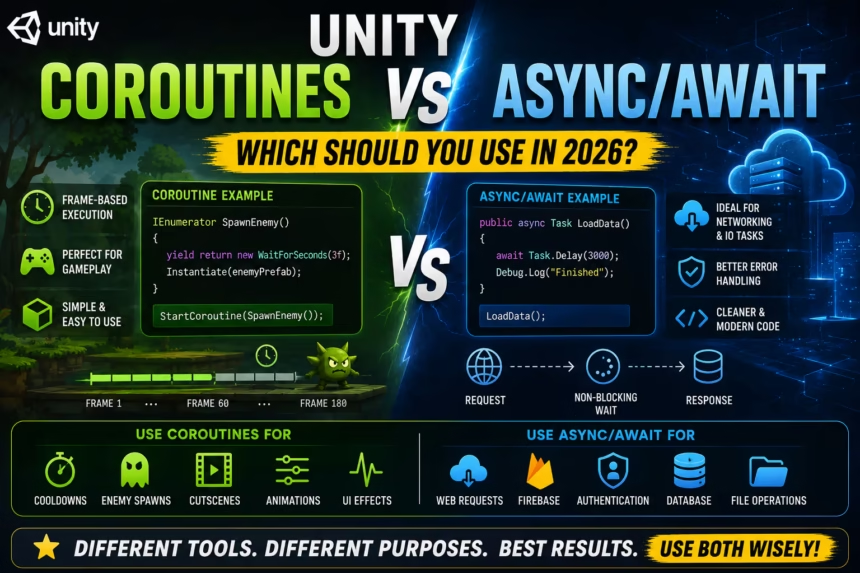
IEnumerator SpawnEnemy()
{
    yield return new WaitForSeconds(3f);

    Instantiate(enemyPrefab);
}
To start the Coroutine:
StartCoroutine(SpawnEnemy());
Unity waits three seconds before spawning the enemy without freezing the game.
This makes Coroutines extremely useful for gameplay-related timing systems.
How Coroutines Work
A common misconception is that Coroutines create new threads.
They do not.
Coroutines still execute on Unity’s main thread.
Unity simply pauses and resumes them between frames using the yield keyword.
Because they remain on the main thread, Coroutines can safely interact with:
- GameObjects
- Transforms
- UI elements
- Animations
- Physics systems
This is one reason why Coroutines are deeply integrated into Unity workflows.
Advantages of Coroutines
Simple Syntax
Coroutines are easy for beginners to learn.
Most developers can understand them within minutes.
Built Into Unity
No additional packages or frameworks are required.
Perfect for Timed Gameplay Events
Coroutines excel at:
- Cooldown systems
- Enemy spawning
- Delayed actions
- Wave management
- Cutscenes
- UI transitions
Easy Access to Unity APIs
Because Coroutines run on the main thread, they can directly interact with Unity objects.
Disadvantages of Coroutines
Not True Multithreading
Coroutines do not move work off the main thread.
Heavy calculations can still impact performance.
Complex Error Handling
Handling exceptions inside Coroutines can become difficult in larger projects.
Limited Scalability for Networking
Large networking systems often become harder to maintain using only Coroutines.
Nested Coroutines Can Become Messy
Deeply chained Coroutines may reduce readability.
What Is Async/Await?
Async/Await is a modern C# language feature designed for asynchronous programming.
It allows developers to write asynchronous code that looks similar to regular synchronous code.
Example:
public async Task LoadData()
{
    await Task.Delay(3000);

    Debug.Log("Finished");
}
The method pauses without blocking the application.
Once the operation completes, execution continues automatically.
How Async/Await Works
Async/Await is built around the concept of Tasks.
A Task represents work that may complete later.
The await keyword tells the program:
“Pause here until the task finishes, then continue.”
This approach often produces cleaner and more maintainable code than callback-based systems.
Advantages of Async/Await
Cleaner Code
Async/Await often results in more readable code compared to nested Coroutines and callbacks.
Excellent Error Handling
Developers can use familiar exception handling:
try
{
    await LoadData();
}
catch(Exception ex)
{
    Debug.LogError(ex);
}
This significantly improves debugging.
Ideal for Networking
Async/Await works extremely well with:
- REST APIs
- Firebase
- Cloud services
- Authentication systems
- Database operations
- File handling
Modern Industry Standard
Async/Await is widely used throughout the C# ecosystem beyond Unity.
Disadvantages of Async/Await
Steeper Learning Curve
Developers must understand:
- Tasks
- Async methods
- Await expressions
- Threading concepts
Unity Main Thread Restrictions
Many Unity APIs can only be accessed from the main thread.
Improper use of Async/Await can lead to errors when attempting to manipulate Unity objects.
Potential Threading Confusion
Beginners may accidentally introduce race conditions or thread-related bugs.
Quick Comparison Table
| Feature | Coroutines | Async/Await |
|---|---|---|
| Beginner Friendly | Excellent | Moderate |
| Built Into Unity | Yes | Yes |
| Gameplay Timers | Excellent | Good |
| Networking | Moderate | Excellent |
| Error Handling | Limited | Excellent |
| Readability | Good | Excellent |
| Main Thread Integration | Excellent | Good |
| Background Tasks | Poor | Excellent |
| Scalability | Moderate | Excellent |
Performance Comparison
Many developers assume Async/Await is automatically faster than Coroutines.
This is not always true.
Coroutines Performance
Coroutines are highly efficient for:
- Frame-based operations
- Gameplay timing
- Animations
- Visual effects
Their overhead is extremely low.
Async/Await Performance
Async/Await shines when waiting for external operations such as:
- Network responses
- Firebase requests
- Database operations
- File reads and writes
The biggest advantage is responsiveness rather than raw speed.
When Should You Use Coroutines?
Coroutines are the ideal choice when working with gameplay systems.
Use Coroutines for:
- Enemy spawning systems
- Cooldown timers
- Wave managers
- Cutscenes
- UI animations
- Timed events
Example:
yield return new WaitForSeconds(5f);
This type of frame-based waiting is exactly what Coroutines were designed for.
When Should You Use Async/Await?
Async/Await is best suited for operations involving external systems.
Use Async/Await for:
- Firebase Authentication
- Firestore operations
- Cloud Save systems
- REST API communication
- User login systems
- Downloading content
Example:
await FirebaseAuth.SignInAnonymouslyAsync();
This creates clean, maintainable networking code.
Coroutines vs Async/Await for Firebase
If your project uses Firebase services such as:
- Authentication
- Firestore
- Realtime Database
- Cloud Functions
Async/Await usually provides the cleaner and more modern approach.
Firebase APIs naturally integrate with Tasks, making Async/Await particularly effective.
Coroutines vs Async/Await for Web Requests
Unity traditionally uses Coroutines for web requests:
yield return webRequest.SendWebRequest();
However, many developers now wrap web requests using Async/Await patterns for improved readability.
For large networking systems, Async/Await often scales better.
A Common Beginner Mistake
Many developers discover Async/Await and immediately try replacing every Coroutine.
This usually creates unnecessary complexity.
For example:
- Cooldown timers should remain Coroutines.
- Enemy spawning should remain Coroutines.
- Firebase operations should use Async/Await.
- Cloud saves should use Async/Await.
Using the right tool for the job produces the best results.
Can You Use Both Together?
Absolutely.
In fact, most professional Unity projects use both approaches simultaneously.
A common setup is:
- Coroutines for gameplay systems
- Async/Await for networking and cloud services
This hybrid approach combines the strengths of both systems.
Frequently Asked Questions
Are Coroutines obsolete in Unity?
No. Coroutines remain one of the most widely used features in Unity development.
Is Async/Await faster than Coroutines?
Not necessarily. Performance depends on the task being performed.
Should beginners learn Coroutines first?
Yes. Coroutines are easier to understand and closely integrated with Unity workflows.
Can Async/Await completely replace Coroutines?
No. Coroutines remain the best solution for many gameplay-related asynchronous tasks.
What do professional Unity developers use?
Most professional developers use both Coroutines and Async/Await depending on the scenario.
Final Verdict
The debate between Coroutines and Async/Await is not about choosing a winner.
Both tools solve different problems and complement each other extremely well.
Coroutines remain the best solution for gameplay events, timers, animations, and frame-based logic.
Async/Await excels at networking, Firebase integration, cloud services, authentication, and data operations.
If you’re developing modern Unity games in 2026, the most effective approach is to learn and use both.
Understanding when to use each technique will help you write cleaner, faster, and more maintainable Unity code.