Firebase makes it easy to build scalable mobile and web applications, but many developers overlook an important security feature that can protect their backend resources from abuse: Firebase App Check.
Without App Check, attackers may attempt to access your Firebase services using stolen API keys, automated scripts, or modified applications. This can lead to increased Firebase costs, spam traffic, and unauthorized resource usage.
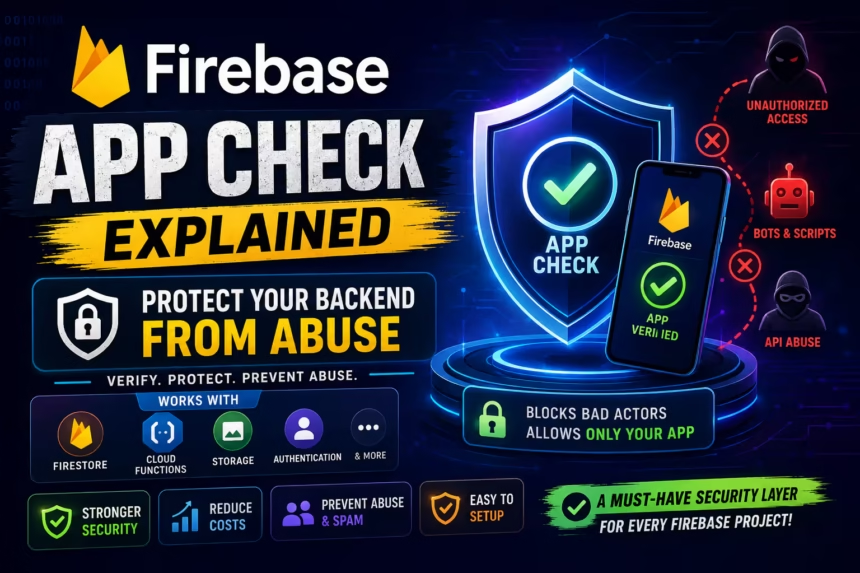
Firebase App Check helps solve this problem by ensuring requests originate from your legitimate application.
In this guide, you’ll learn what Firebase App Check is, how it works, how to enable it, and why every Firebase project should use it.
What Is Firebase App Check?
Firebase App Check is a security feature that protects Firebase services from unauthorized clients.
It verifies that incoming requests come from:
- Your official Android application
- Your official iOS application
- Your authorized web application
Instead of accepting requests from any source, Firebase validates whether the request comes from a trusted environment.
Why Firebase API Keys Are Not Secret
Many developers mistakenly assume Firebase API keys are private credentials.
In reality, Firebase API keys are designed as project identifiers and can often be extracted from:
- APK files
- Decompiled applications
- Network requests
- Public repositories
This is why Firebase App Check exists. It provides an additional verification layer beyond API keys.
How Firebase App Check Works
Without App Check
Mobile App
      ↓
Firebase Backend
Any client with project configuration details may attempt to send requests.
With App Check
Mobile App
      ↓
App Check Verification
      ↓
Firebase Backend
Firebase verifies App Check tokens before allowing access to protected resources.
Firebase Services Protected by App Check
Firebase App Check can protect multiple Firebase products.
Cloud Firestore
Protects database access from unauthorized clients.
Realtime Database
Reduces abuse and suspicious requests.
Cloud Functions
Helps prevent expensive function execution abuse.
Firebase Storage
Protects uploaded and downloaded files.
Firebase Authentication
Adds additional request validation.
Firebase AI Services
Helps prevent unauthorized AI usage and API abuse.
Supported App Check Providers
Android – Play Integrity API
Google recommends Play Integrity API for Android applications.
Benefits include:
- Device verification
- Application verification
- Anti-tampering protection
- Stronger security checks
iOS – App Attest
Apple’s App Attest service provides app verification for iOS applications.
Web – reCAPTCHA Enterprise
Web applications can use reCAPTCHA Enterprise to protect against automated abuse and bots.
Why Developers Should Enable App Check
1. Prevent Backend Abuse
Without App Check, attackers can create scripts that repeatedly access your Firebase resources.
This can result in:
- Excessive database reads
- Storage abuse
- Cloud Function overuse
- Unexpected billing
2. Reduce Firebase Costs
Many Firebase products charge based on usage.
Examples include:
- Firestore reads and writes
- Storage downloads
- Cloud Function invocations
- AI service requests
App Check helps ensure only legitimate requests consume resources.
3. Improve Overall Security
Firebase security works best when multiple layers are combined.
App Check adds protection beyond:
- Authentication
- Authorization
- Security Rules
Firebase App Check vs Firebase Authentication
| Feature | App Check | Authentication |
|---|---|---|
| Verifies Application | ✅ Yes | ❌ No |
| Verifies User | ❌ No | ✅ Yes |
| Prevents Backend Abuse | ✅ Yes | ❌ No |
| Requires User Login | ❌ No | ✅ Yes |
Think of it this way:
- Authentication: Who is the user?
- App Check: Is this request coming from a legitimate application?
Both are important and serve different purposes.
How to Enable Firebase App Check
Step 1 – Open Firebase Console
Build
→ App Check
Step 2 – Select Your Application
Choose the Android, iOS, or Web app you want to protect.
Step 3 – Choose a Provider
For Android applications, select:
Play Integrity
Step 4 – Register the Provider
Follow the Firebase Console instructions to register App Check for your project.
Step 5 – Add the SDK
implementation("com.google.firebase:firebase-appcheck-playintegrity")
Step 6 – Initialize App Check
FirebaseAppCheck.getInstance()
    .installAppCheckProviderFactory(
        PlayIntegrityAppCheckProviderFactory.getInstance()
    )
Monitor Mode Before Enforcement
Firebase recommends enabling App Check in monitoring mode before enforcement.
Benefits
- Identify integration problems
- Verify token generation
- Avoid accidental service interruptions
After confirming everything works correctly, enable enforcement
Common Firebase App Check Errors
Invalid Token
Usually caused by:
- Incorrect setup
- Outdated SDK versions
- Provider configuration issues
Too Many Requests
Can occur during testing or excessive token generation.
Unverified Requests
Often caused by:
- Missing SDK integration
- Emulator usage
- Improper initialization
Does App Check Affect Development?
Yes.
Development environments such as emulators often fail verification checks.
Firebase provides debug providers and debug tokens to support local development and testing.
Best Practices for Firebase App Check
Enable App Check Early
Protect your project before public release.
Use Play Integrity on Android
Google recommends Play Integrity for production Android apps.
Monitor App Check Metrics
Review App Check dashboards regularly to identify suspicious traffic.
Combine App Check with Security Rules
Never rely solely on App Check.
Use:
- Authentication
- Firestore Security Rules
- App Check
Together for maximum protection.
Enable Enforcement Gradually
Start with monitoring mode, then switch to enforcement once verification is complete.
Advantages of Firebase App Check
- Prevents unauthorized backend access
- Reduces automated abuse
- Protects Firebase resources
- Reduces unexpected costs
- Simple integration process
- Supports Android, iOS, and Web
Limitations of App Check
Although App Check is powerful, it is not a complete security solution.
It cannot:
- Replace Firebase Authentication
- Replace Firestore Security Rules
- Guarantee complete protection
Security should always be implemented using multiple layers.
Frequently Asked Questions
Is Firebase App Check mandatory?
No, but it is strongly recommended for production applications.
Does App Check replace Authentication?
No. Authentication verifies users, while App Check verifies applications.
Does App Check increase Firebase costs?
No. In most cases, it helps reduce costs by preventing abuse.
Should small projects use App Check?
Yes. Even small projects can become targets for automated abuse.
Does App Check work with Firestore?
Yes. Firestore is one of the most commonly protected Firebase services.
Final Verdict
Firebase App Check is one of the most valuable security features available in Firebase today.
While Authentication verifies users and Security Rules protect data access, App Check ensures requests originate from legitimate applications.
For Android, iOS, Unity, and Web applications using Firebase in 2026, enabling App Check should be considered a security best practice.
By combining:
- Authentication
- Security Rules
- App Check
you can significantly improve security, reduce abuse, and protect your Firebase resources from unauthorized access.