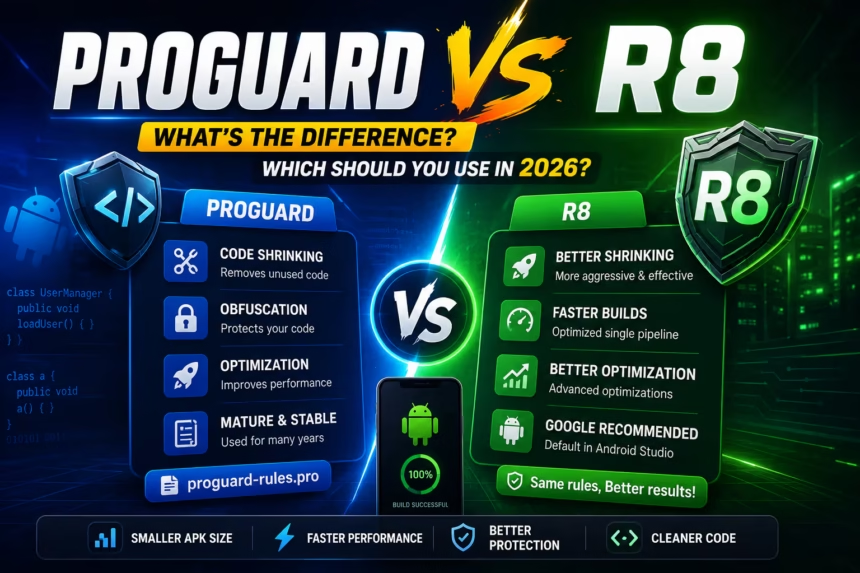
When building Android applications, reducing APK size and protecting source code are important optimization tasks.
For years, Android developers relied on ProGuard for code shrinking, optimization, and obfuscation. Today, Google recommends R8, a newer and more efficient solution integrated into modern Android Studio builds.
If you’ve encountered files like:
proguard-rules.pro
or build logs mentioning:
R8
you may wonder which tool is better and whether ProGuard is still relevant.
In this guide, we’ll compare ProGuard and R8, explain how they work, and help you choose the right option for Android development in 2026.
What Is ProGuard?
ProGuard is a Java bytecode optimizer and obfuscator designed to improve application performance and reduce application size.
Main Features
- Code shrinking
- Unused code removal
- Bytecode optimization
- Class obfuscation
- APK size reduction
Example
Before obfuscation:
public class UserManager
{
    public void loadUser()
    {
    }
}
After obfuscation:
public class a
{
    public void a()
    {
    }
}
This makes reverse engineering significantly more difficult.
What Is R8?
R8 is Google’s modern Android code shrinker that combines multiple build steps into a single optimized process.
R8 performs:
- Code shrinking
- Code optimization
- Obfuscation
- Desugaring
- DEX generation
It became the default Android code shrinker starting with modern Android Studio releases.
Why Google Created R8
Before R8, Android builds typically followed this workflow:
Java/Kotlin Code
        ↓
     ProGuard
        ↓
        D8
        ↓
      APK
Multiple processing stages were required.
With R8:
Java/Kotlin Code
        ↓
        R8
        ↓
      APK
The entire process becomes faster and more efficient.
ProGuard vs R8 Architecture
ProGuard Workflow
Source Code
      ↓
Compilation
      ↓
ProGuard
      ↓
D8
      ↓
APK
R8 Workflow
Source Code
      ↓
Compilation
      ↓
R8
      ↓
APK
By combining multiple stages, R8 reduces build complexity and improves optimization opportunities.
APK Size Comparison
One of the primary goals of both tools is reducing APK size.
ProGuard
- Removes unused classes
- Performs standard optimization
- Reduces final APK size
R8
- More aggressive code shrinking
- Improved dead code elimination
- Advanced optimization techniques
- Smaller final APKs
Winner
🏆 R8
Most Android projects achieve better APK size reduction using R8.
Build Speed Comparison
ProGuard
Uses separate shrinking and dexing processes.
R8
Combines shrinking and dex generation into one pipeline.
Winner
🏆 R8
Build times are generally faster when using R8.
Obfuscation Comparison
Both tools support:
- Class name obfuscation
- Method name obfuscation
- Field name obfuscation
Example:
UserProfileManager
becomes:
a
Winner
🤝 Tie
Both provide strong code obfuscation capabilities.
Optimization Comparison
ProGuard
- Basic optimization
- Traditional bytecode improvements
R8
- Advanced inlining
- Improved dead code removal
- Better optimization algorithms
- Enhanced code shrinking
Winner
🏆 R8
Security Comparison
Many developers assume obfuscation equals security.
In reality:
- Obfuscation makes reverse engineering harder
- Implementation details become less readable
- Apps are not impossible to crack
Winner
🤝 Tie
Both provide similar security benefits.
Android Studio Support
ProGuard
Still supported but no longer the preferred solution.
R8
Default Android Studio code shrinker.
Actively maintained and improved by Google.
Winner
🏆 R8
Configuration Files
One confusing aspect is that R8 still uses ProGuard rule files.
You’ll commonly see:
proguard-rules.pro
Example rule:
-keep class com.example.** { *; }
Most existing ProGuard rules work directly with R8.
Common R8 Errors and Fixes
Missing Class Errors
Missing class:
Often caused by aggressive code shrinking.
Reflection Issues
Classes accessed through reflection may be removed accidentally.
Serialization Problems
Required model classes can be removed if proper keep rules are missing.
Solution
-keep class com.example.models.** { *; }
Keep rules prevent important classes from being removed.
When Should You Use ProGuard?
Today, very few new projects require ProGuard directly.
Possible reasons include:
- Maintaining legacy Android projects
- Older build pipelines
- Enterprise applications with existing ProGuard workflows
When Should You Use R8?
R8 is recommended for:
- New Android applications
- Kotlin projects
- Modern Android Studio versions
- Production applications
- APK size optimization
- Performance-focused builds
ProGuard vs R8 Comparison Table
| Feature | ProGuard | R8 |
|---|---|---|
| Code Shrinking | Yes | Yes |
| Obfuscation | Yes | Yes |
| Optimization | Good | Better |
| Build Speed | Good | Faster |
| APK Size Reduction | Good | Better |
| Android Studio Default | No | Yes |
| Active Development | Limited | Active |
| Recommended for New Apps | No | Yes |
Best Practices
Enable R8 for Release Builds
buildTypes {
    release {
        minifyEnabled true
    }
}
Test Release Builds Thoroughly
Some issues only appear after code shrinking and obfuscation.
Use Keep Rules Carefully
Prevent important classes from being removed.
Monitor APK Size
Compare release builds regularly to identify optimization opportunities.
Frequently Asked Questions
Is ProGuard deprecated?
ProGuard still exists, but R8 has become the default Android code shrinker.
Does R8 replace ProGuard?
For most Android projects, yes.
Is R8 faster?
Generally yes, because it combines multiple build stages into one process.
Does R8 use ProGuard rules?
Yes. Most existing ProGuard rule files work directly with R8.
Should I disable R8?
Usually no. Most Android applications benefit from R8 optimizations.
Final Verdict
ProGuard played a major role in Android development for many years, but R8 has become the modern standard.
For Android development in 2026:
- Use R8 for new Android projects.
- Continue using existing ProGuard rules where needed.
- Test release builds carefully.
- Take advantage of R8’s superior optimization capabilities.
If you’re building Android apps using modern Android Studio versions, R8 is the clear winner thanks to faster builds, better APK size reduction, and improved optimization.