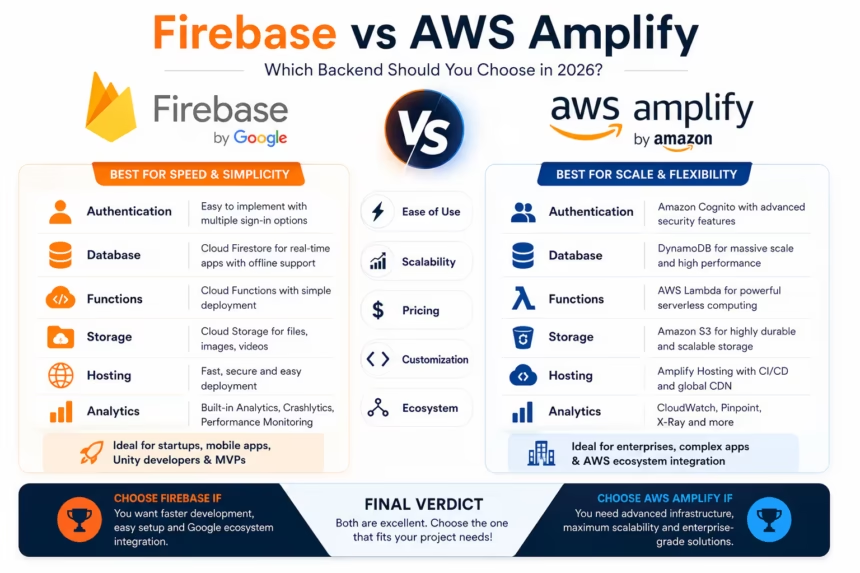
Choosing the right backend platform can dramatically affect development speed, scalability, maintenance costs, and overall project success.
Two of the most popular Backend-as-a-Service (BaaS) solutions available today are Firebase from Google and AWS Amplify from Amazon.
Both platforms offer authentication, databases, storage, hosting, and serverless functionality, allowing developers to build applications without managing traditional backend infrastructure.
But which platform is the better choice in 2026?
In this guide, we’ll compare Firebase and AWS Amplify across features, pricing, scalability, performance, and developer experience.
What Is Firebase?
Firebase is Google’s application development platform designed to help developers build and scale mobile and web applications quickly.
Popular Firebase Services
- Firebase Authentication
- Cloud Firestore
- Realtime Database
- Cloud Functions
- Cloud Storage
- Firebase Hosting
- Analytics
- Crashlytics
- App Check
Firebase focuses heavily on ease of use and rapid development.
What Is AWS Amplify?
AWS Amplify is Amazon’s full-stack development platform built on top of AWS cloud services.
Popular Amplify Features
- Amazon Cognito Authentication
- GraphQL APIs
- REST APIs
- DynamoDB Integration
- S3 Storage
- AWS Lambda
- Amplify Hosting
- Analytics
Amplify simplifies access to AWS infrastructure while maintaining enterprise-level flexibility.
Firebase vs AWS Amplify Overview
| Feature | Firebase | AWS Amplify |
|---|---|---|
| Company | Amazon | |
| Learning Curve | Easy | Moderate |
| Authentication | Excellent | Excellent |
| Database | Cloud Firestore | DynamoDB |
| Functions | Cloud Functions | AWS Lambda |
| Hosting | Firebase Hosting | Amplify Hosting |
| Analytics | Built-In | AWS Services |
| Scalability | High | Very High |
| Beginner Friendly | Excellent | Good |
Ease of Use
Firebase
Firebase is designed to get developers up and running quickly.
A typical setup often takes only a few minutes:
- Create a Firebase project
- Add the SDK
- Connect Firestore
- Start building
Most services work with minimal configuration.
Winner
🏆 Firebase
AWS Amplify
Amplify simplifies AWS development, but developers still need to understand AWS concepts such as:
- IAM Permissions
- Cognito
- Lambda
- DynamoDB
- S3
The learning curve is steeper for beginners.
Authentication Comparison
Firebase Authentication
Supports:
- Email & Password
- Google Sign-In
- Apple Sign-In
- Facebook Login
- Phone Authentication
- Anonymous Authentication
Implementation is straightforward and beginner-friendly.
AWS Amplify Authentication
Powered by Amazon Cognito.
Supports:
- Social Logins
- Multi-Factor Authentication
- Enterprise Identity Providers
- Advanced Security Controls
More powerful but also more complex.
Winner
🏆 Firebase for simplicity
🏆 AWS Amplify for enterprise authentication
Database Comparison
Firebase Firestore
Firestore is a real-time NoSQL database designed for mobile and web applications.
Benefits
- Real-time synchronization
- Offline support
- Flexible data structure
- Simple SDK integration
Ideal for chat apps, mobile applications, dashboards, and real-time systems.
AWS DynamoDB
DynamoDB is Amazon’s highly scalable NoSQL database.
Benefits
- Massive scalability
- Low latency
- AWS ecosystem integration
- Enterprise-ready architecture
Winner
🏆 Firebase for rapid development
🏆 AWS Amplify for large-scale enterprise workloads
Serverless Functions
Firebase Cloud Functions
exports.helloWorld = onRequest((req, res) => {
  res.send("Hello World");
});
Cloud Functions are easy to deploy and integrate with Firebase services.
AWS Lambda
Lambda offers:
- Advanced workflows
- Event-driven architecture
- AWS service integration
- Highly customizable infrastructure
Winner
🏆 Firebase for simplicity
🏆 AWS Amplify for flexibility
Hosting Comparison
Firebase Hosting
- Fast global CDN
- Free SSL certificates
- Simple deployment process
- Excellent developer experience
Amplify Hosting
- Git-based deployment
- CI/CD support
- AWS infrastructure integration
- Automatic scaling
Winner
🤝 Tie
Both provide excellent hosting capabilities.
Scalability Comparison
Firebase
Firebase can easily support millions of users and powers many successful applications.
AWS Amplify
Built on AWS infrastructure, offering virtually unlimited scalability.
Winner
🏆 AWS Amplify
Analytics and Monitoring
Firebase
Includes:
- Google Analytics
- Crashlytics
- Performance Monitoring
Everything is integrated directly into the Firebase Console.
AWS Amplify
Uses:
- CloudWatch
- AWS X-Ray
- Amazon Pinpoint
Powerful but requires more configuration.
Winner
🏆 Firebase
Pricing Comparison
Firebase Pricing
Advantages
- Generous free tier
- Simple pricing model
- Startup-friendly
Disadvantages
- Firestore costs can increase with heavy usage
AWS Amplify Pricing
Advantages
- Flexible pay-as-you-go model
- Enterprise optimization options
Disadvantages
- Pricing is harder to estimate
- Multiple AWS services affect billing
Winner
🏆 Firebase for startups
🏆 AWS Amplify for enterprise optimization
Firebase vs AWS Amplify for Unity Developers
Firebase is widely used within Unity projects.
Popular integrations include:
- Authentication
- Firestore
- Analytics
- Remote Config
- Cloud Messaging
AWS Amplify is less common in Unity development and generally requires additional AWS expertise.
Winner
🏆 Firebase
Firebase vs AWS Amplify for Android Developers
Firebase provides:
- Excellent Android support
- Google ecosystem integration
- Simple setup process
- Outstanding documentation
Amplify provides stronger enterprise cloud capabilities but is more complex.
Winner
🏆 Firebase
Pros and Cons
Firebase Pros
- Beginner-friendly
- Rapid development
- Excellent documentation
- Built-in analytics
- Strong Android support
Firebase Cons
- Vendor lock-in
- Firestore costs may increase at scale
AWS Amplify Pros
- AWS ecosystem access
- Massive scalability
- Enterprise features
- Flexible architecture
AWS Amplify Cons
- Steeper learning curve
- More configuration required
- Pricing complexity
Frequently Asked Questions
Is Firebase easier than AWS Amplify?
Yes. Firebase is generally much easier for beginners and small teams.
Is AWS Amplify more scalable?
Yes. AWS infrastructure provides virtually unlimited scalability.
Which is better for Android apps?
Firebase is usually the better choice due to native Android support and easier integration.
Which is better for startups?
Firebase is often preferred because of faster development and lower complexity.
Which is better for enterprise applications?
AWS Amplify is typically better suited for large-scale enterprise infrastructure.
Final Verdict
Both Firebase and AWS Amplify are excellent backend platforms, but they target different audiences.
Choose Firebase If:
- You are building Android apps
- You are developing Unity games
- You want rapid development
- You are a solo developer or startup
- You prefer simplicity
Choose AWS Amplify If:
- You already use AWS services
- You need enterprise-grade infrastructure
- You require advanced cloud architecture
- You expect extremely large-scale workloads
For most Android developers, Unity developers, indie creators, and startups in 2026, Firebase remains the better choice thanks to its simplicity, speed, and developer-friendly ecosystem.