
Last updated: October 2026
Can AI-generated songs really earn money on YouTube? When I started looking for an answer, I found two kinds of advice. Some people said YouTube bans AI music. Others said you can get monetized by uploading AI songs in bulk. Both sounded wrong to me, so I decided to test it myself.
I wrote my own lyrics, worked on the tune myself, used Suno AI to generate the vocals, and uploaded songs in Hindi, Tamil, and Malayalam. My channel got approved for monetization.
In this guide I’ll share exactly what I did, the tools I used, what the current rules say, and the mistakes I’d advise you to avoid.
My Results at a Glance
- Languages: Hindi, Tamil, and Malayalam
- Videos uploaded: about 20
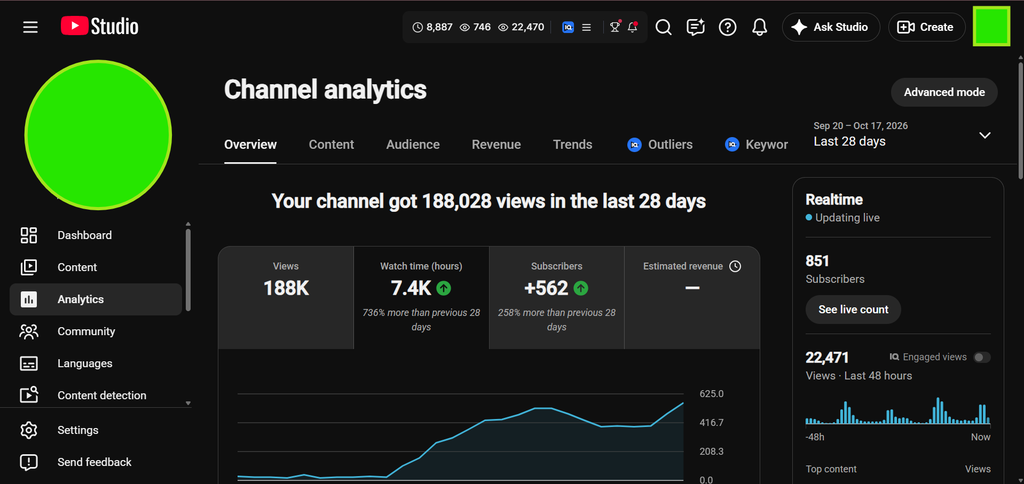
- Subscribers: 500+ in the first week
- Watch time: around 7,000 hours in the first month
- Copyright claims: none
- Suno plan: Pro
- Result: Approved for YouTube monetization
Results like these are never guaranteed. Every channel is different, and I’ll share what I think made the difference later in this post.
Can You Really Get YouTube Monetization with AI Music?
Yes, it is possible, but not by simply uploading AI songs.
YouTube does not ban AI-generated content. Its monetization rules look at whether your channel is original and valuable. In July 2025, YouTube renamed its “repetitious content” policy to “inauthentic content” to make this clear. This policy targets content that is mass-produced, repetitive, made from the same template, or easy to copy at huge scale.
So YouTube’s real question is not “Did you use AI?” It is more like “Is there genuine human creativity and value here?” My whole approach was built around that idea.
What Is Suno AI?
Suno is an AI music tool that creates complete songs, with vocals and instruments, from your lyrics and a style description. You add lyrics, describe the genre and mood, and Suno generates songs you can listen to and compare.
Suno has free and paid plans, and that difference matters a lot for YouTube.
Why You Need the Suno Pro Plan
I used the Suno Pro plan, and if you want to monetize, a paid plan is essential.
- Songs made on Suno’s free plan are for personal, non-commercial use only. You can’t monetize them.
- Songs made on a paid plan (Pro or Premier) while you are subscribed come with commercial use rights.
- These rights are not retroactive. Upgrading later does not cover songs you already made on the free plan.
So subscribe to a paid plan before you create the songs you plan to upload.
Note: Suno updates its plans and terms regularly, and there have been reports of changes to download limits and terms in September 2026. Always read the latest terms on Suno’s official website before you start.
YouTube Monetization Requirements (Updated October 2026)
Tier 1: Early access (fan funding and shopping features)
- 500 subscribers
- 3 public uploads in the last 90 days
- 3,000 public watch hours in the last 12 months, or 3 million public Shorts views in the last 90 days
Tier 2: Ad revenue (full YouTube Partner Program)
- 1,000 subscribers
- 4,000 public watch hours in the last 12 months, or 10 million public Shorts views in the last 90 days
A big change is coming. YouTube announced that from February 1, 2027, new creators applying for ad revenue will need 8,000 watch hours instead of 4,000, or 20 million Shorts views instead of 10 million. The 1,000 subscriber requirement stays the same.
A few more things to remember:
- You need to meet the watch hours path or the Shorts views path, not both.
- Watch hours from Shorts don’t count toward the long-form watch hour requirement.
- You also need to follow YouTube’s monetization policies, enable 2-step verification, and link an AdSense account.
If you’re planning to start a channel, it’s worth reaching the requirements before the new thresholds begin.
YouTube’s Rules on AI Music
Two separate things are often mixed up here.
1. AI Disclosure
YouTube asks creators to disclose content that is realistic and made or meaningfully altered with AI, and its guidance lists AI-generated music as an example. You’ll find this in the upload details in YouTube Studio, in the question about altered or synthetic content. YouTube has said that this label does not, by itself, reduce your monetization eligibility. My advice is to answer that question honestly whenever it applies to your video.
2. Inauthentic Content
This is the policy that matters most for AI music channels. The main risk is a channel that uploads formulaic, near-identical, mass-produced songs with very little human effort. A large number of AI tracks over the same static image is the classic example of what to avoid.
Disclosure and monetization review are separate systems. A properly labeled AI video can still fail monetization if the channel looks mass-produced, while an AI-assisted channel with real creative effort can be approved.
My Step-by-Step Process
Step 1: Choose Your Languages and Audience
I made songs in Hindi, Tamil, and Malayalam. Writing for several language audiences gave my channel variety, and each of these languages has a huge audience that loves music.
If you’re starting out, choose languages you actually understand. It’s much easier to write good lyrics, spot pronunciation mistakes, and connect with listeners when you know the language well.
Step 2: Write Your Own Lyrics and Tune
This was the most important step. I did not let AI create everything. The lyrics and the tune were my own work, and Suno generated the vocals.
This human input is what separates a real music channel from bulk AI uploads. Every song should have its own theme, its own lyrics, and its own feel. That is the kind of originality YouTube’s policy is looking for.
Step 3: Generate the Vocals in Suno
With the Pro plan, I used my lyrics in Suno to generate the vocals. Here are some tips that I recommend for anyone doing this:
- Generate more than one version of a song and choose the best, rather than accepting the first result.
- Listen carefully for pronunciation mistakes. AI can mispronounce words in Hindi, Tamil, and Malayalam, and listeners notice quickly. Adjusting the spelling of tricky words in the lyrics often helps.
- If a version has glitches or odd sounds, regenerate it.
Step 4: Create Titles with ChatGPT
I used ChatGPT to create my video titles. Give it the song’s theme, language, and mood, ask for several title ideas, then pick one and edit it so it sounds natural. This saves time on a small task while the creative core of the video stays yours.
Step 5: Edit the Video in CapCut and KineMaster
I made my videos with CapCut and KineMaster on my phone. Both are easy to learn and let you combine your song with visuals, text, and effects.
Some principles worth following:
- Don’t upload a song over one plain, static image.
- Make each video look different, with its own mood and style.
- Only use images, clips, fonts, and effects that you created or that are allowed for commercial use.
Step 6: Upload with a Clear Title, Description, and Thumbnail
For each upload, write a clear title, a helpful description, and a custom thumbnail. It also builds trust to mention in the description that the song was made with AI tools.
Step 7: Focus on Quality, Not Quantity
I uploaded about 20 videos. That’s a small number, so I could pay attention to the quality of each one instead of rushing out dozens of near-identical songs. For a new channel, this approach is much safer.
What I Believe Helped Me Get Approved
I can’t see inside YouTube’s review process, so this is my honest opinion based on my experience:
- Original lyrics and tune. Every song had real human input.
- A paid Suno plan. I had commercial rights for the songs I uploaded.
- No copyright issues. I didn’t use other people’s music or content, and I had no copyright claims.
- Variety. Different languages and songs instead of copies of one template.
- Audience interest. Viewers connected with the songs, which showed in subscribers and watch time.
- A manageable number of quality videos instead of mass uploading.
Mistakes to Avoid
- Using the free Suno plan for songs you want to monetize.
- Uploading dozens of near-identical songs. It looks mass-produced.
- Using copyrighted images, clips, or background music in your videos.
- Skipping the listening check. Mispronounced words hurt viewers’ trust.
- Copying other people’s lyrics or melodies.
- Buying subscribers, views, or watch time. This can get your channel penalized.
- Ignoring the AI disclosure question when it applies to your video.
Copyright and Legal Notes
I had no copyright claims on my videos, but that is my experience, not a promise for everyone.
- Suno doesn’t guarantee that its output will never resemble existing music, so always listen to your songs before uploading.
- Copyright law for AI-generated music is still developing, and it differs from country to country.
- Keep records of your lyrics, your Suno subscription, and the dates you created your songs.
- This article is not legal advice. For serious commercial use, consult a qualified professional.
Realistic Earnings Expectations
Monetization approval only means you are allowed to earn. It doesn’t mean you will earn a lot. Income depends on views, audience location, watch time, content type, and many other factors. I won’t promise any numbers. Treat this as a long-term project that needs patience, good songs, and steady improvement.
Frequently Asked Questions
Can AI music be monetized on YouTube?
Yes, if your channel follows YouTube’s policies, offers real originality and value, and you have the rights to the music.
Do I need the Suno Pro plan?
For monetized videos you need a paid plan that includes commercial rights. Songs created on the free plan can’t be monetized.
Will YouTube reject my channel for using AI?
Not automatically. The risk is mass-produced, repetitive, low-effort content, not AI itself.
Do I have to disclose AI use?
When YouTube’s rules apply to your content, yes. Answer the disclosure question honestly in YouTube Studio.
How many videos do I need?
There is no fixed number. I had about 20 videos, but quality and audience response matter more than the count.
Will the new 8,000 watch hour rule affect me?
It applies to new creators applying for ad revenue from February 1, 2027. If you apply before that date, the current requirements apply.
Can I use CapCut or KineMaster for monetized videos?
Yes, they are popular editing tools. Just make sure every track, image, and effect you use is allowed for commercial use.
Final Thoughts
AI music can earn on YouTube, but only if you treat AI as a tool, not a replacement for your own creativity. Write your own lyrics, shape your own tunes, use a paid plan, respect copyright, and make every video worth watching.
If you’re starting your own channel, begin with a clear idea, a small set of quality videos, and an honest approach. You can also read my other guides on How to Start a YouTube Channel and Why AdSense Gets Rejected. If you have questions, reach out through my Contact page.
Disclaimer: This article shares my personal experience. YouTube and Suno policies change often, and results are not guaranteed. Always check the latest official rules before you start.
